|
E-mail links provide an
easy way for Web page users to get in contact
with people related to the Web site, or for the
webmaster to receive feedback on the Web page.
The general e-mail and feedback link "webmaster"
on the right side of this page is such an example.
When the user clicks on the e-mail link, the e-mail
software will open with the recipient address
already filled in.
To create an e-mail link, you can either type
in a link to the recepient's address using html
script or by filling in a window box. The easy
way to link a picture or text to an e-mail address
is to select the object and click on Insert >
Email link. A box should appear as seen in the
picture below.
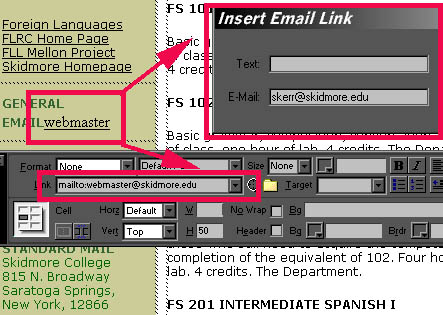
Fill in the e-mail address (if you have not already
created text to link the address, then fill in
the text: line too; otherwise, leave it empty).
The Object Properties box should display "mailto:"
and the address that you have entered. To verify
that everything is working correctly, you may
want to preview the Web page and try clicking
on the link yourself. To learn how to preview
your Web page, see the section on "Previewing
Your Web Page."
Please proceed to the next section ...
|