|
To access the HTML code of your Web page, simply
select View > Design and code. Dreamweaver
4 will open a dual interface system where the
HTML code is located in the top window, and the
design layout is in the bottom window.
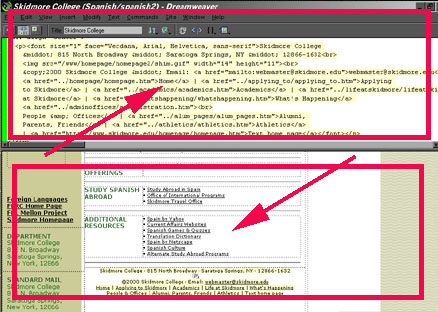
This interface is a breakthrough in Web design,
as it will autmatically locate the code in the
top window if you select the objects in the bottom
window. Conversely, if you select code in the
top window, the objects in the bottom window corresponding
to this code will be highlighted.
Although Dreamweaver allows the user to create
a Web page with almost no knowledge of HTML, there
are a few commands that will be very helpful.
The "line break" command is one of the
most useful shortcuts.
Write a line of text (dog) on an empty line in
the design window and press Shift-Enter.
Now highlight this text and look for it in the
top (code) window.
It should appear as follows: "dog<br>"
The <br> signifies that you pressed Shift-Enter
to indicate a line break after "dog."
Use the Shift-Enter command frequently whenever
you wish to break a line of text without double
spacing (or conforming to the line-spacing settings
of your page).
Please proceed to the next section...
|