Once
you have completed designing your Web page, the final
step is to upload your files to a 24-hour Web server
so that they will be availible for anyone to view at
any time. The Skidmore Web server has no size limits,
so you may upload as much material as needed. Your files
will, however, be monitored by server administrators,
and large files such as 50MB videos or 20MB picture
files will have to be deleted once the administrator
contacts you.
Before uploading any files, it is important for you
to go through every file in your local site directory
to determine which files are not being used and which
files need to be made smaller. You can
access a file navigator by selecting site > site
files or pressing F8.
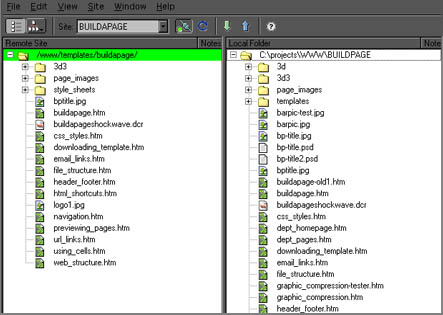
The left side of the picture shows the files that were
uploaded; the right side shows the files on the local
user's hard drive. As you can see, this person decided
to upload one directory and several other files, rather
than his entire Web site directory. This makes the Web
page and server faster and more efficient.
After deciding which files will be used and uploaded,
continue to the next section to configure the site definitions...
|