Uploading
and Downloading Via FTP (Sec. 4.3)
Now
that your site has been defined, click on Site >
Site Files and select your predefined site where you
see "Site:". To connect with the server, simply
click the button containing two unconnected wires (as
seen in the red box below). Once connected, the button
should turn green, and a list of files should appear
on the let hand side of the screen.
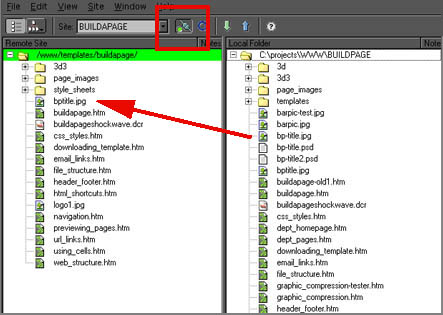
Now proceed to select the files on the right side (your
hard drive) that you have previously determined necessary
for your Web page, and move them to the left side. After
each file or group of files is moved, a bit rate transfer
should appear at the bottom of the window. Don't forget
to move all the directories over as well.
Congratulations! You can now view your Web page
from any computer.
To access your web page, type in the "www.skidmore.edu/....
/homepage.htm" where "...." corresponds
to the directory on the server where your home page
is located.
Please proceed to the final section on maintaining your
Web site.
|