|
After designing your first home page, you will
want to link it to other secondary and tertiary
pages for the user to access. You may also want
to provide the user with links outside your page
and to other files and pictures. Dreamweaver allows
you to link any object, including text and pictures
(although pictures should contain text making
it obvious that it is a link) to another Web page.
To link text or a picture, simply highlight the
text or object and open the properties window
(Window > Properties).
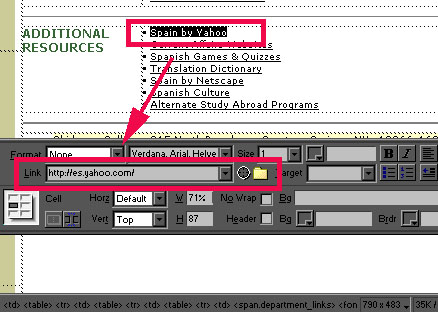
You have three options for creating the link.
You can manually type in the link in the empty
box and press Enter. Alternatively, you can use
the target arrow or file icon next to the empty
box to locate the Web page or item you wish to
link to. To verify that the link is working, you
may wish to preview the home page and click on
the link to see if it brings you where you wish
to go. See the "previewing your Web page"
section to do so.
Please proceed to the next section ...
|