Entering Authors, Investigators, Presenters, Performers, etc.
There are six screens under the Scholarship/Research category:
- Contracts, Fellowships, Grants, and Sponsored Research
- Exhibits and Performances
- Intellectual Property
- Presentations
- Publications
- Other Research Activity
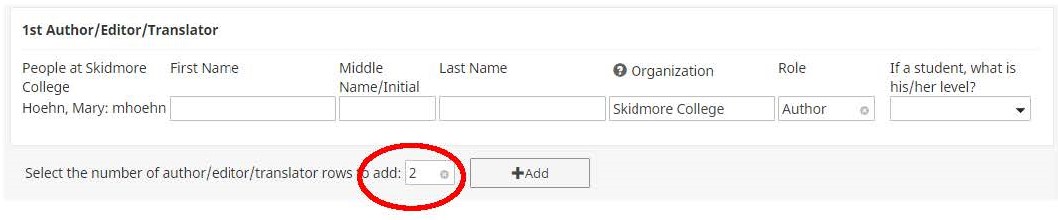
When you enter a record, by default, you will appear as the first author, investigator, presenter, performer, inventor etc. Your last name, first name, and username will be displayed at the far left under “People at Skidmore College.” You do not need to enter your name in the blank fields to the right of your username unless you want the record to reflect a different name:

In cases where you wish to use a different name, you can alter the name that will be displayed in Digital Measures reports for the record you are entering. In the blank fields to the right of where your username appears, type the alternate name you wish to use for that record. Your reports will display that entry with the alternate name:

Note: This will only affect the record for which the information is entered. The information must be entered into each record for which you want an alternative name to be displayed.
To add additional contributors, select the appropriate number of contributors to add in the box to the right of "Select the number of author/editor/translator rows to add" and then click on the +Add button:
If the co-contributor is a faculty member at Skidmore, you may select his/her name from the “Select or type a name” drop-down list on the left:
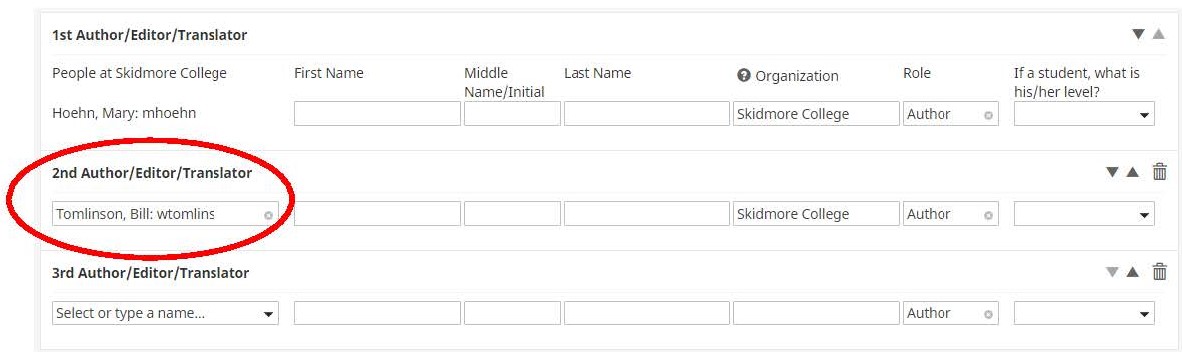
Once you have selected the contributor’s name from the drop-down list, you do not need to enter his/her name in the blank fields to the right of where his/her username appears unless you want the record to reflect a different name.
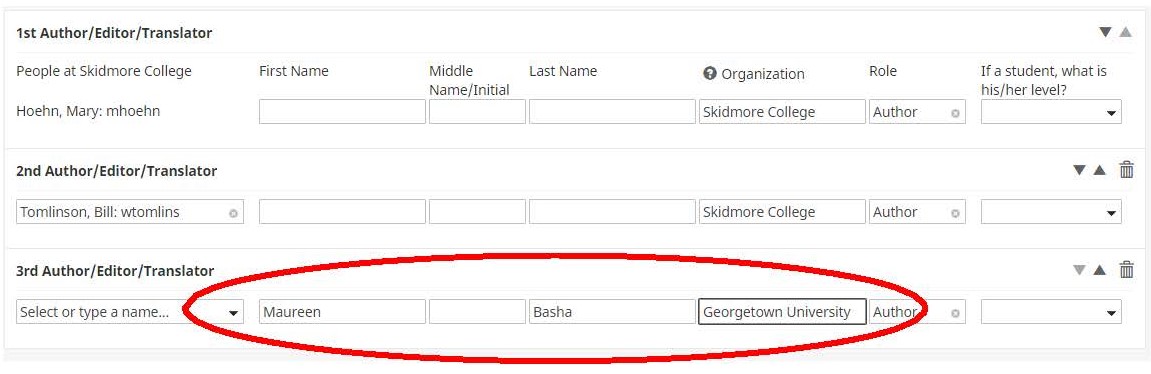
Skidmore students and non-Skidmore faculty will not appear in the drop-down list. If the co-contributor is a student or is not a faculty member at Skidmore, type the name of the individual and his/her organization in the fields to the right of the drop-down list:
Note: Digital Measures is a relational database. For example, if multiple Skidmore users authored an article, the first user to enter the citation is considered the “owner” of the record. When a user enters the citation, the record will be associated with all of the collaborating authors. If you see a record that says, “Entered By: Faculty Name,” then a co-contributor has already created the record. Please do not create a duplicate record. If any of the information entered by your co-contributor is incorrect, please work with that individual to correct it.
Changing Contributor Order
For records with more than one contributor, you can easily change the contributing order using the three icons on the far right side of the page:
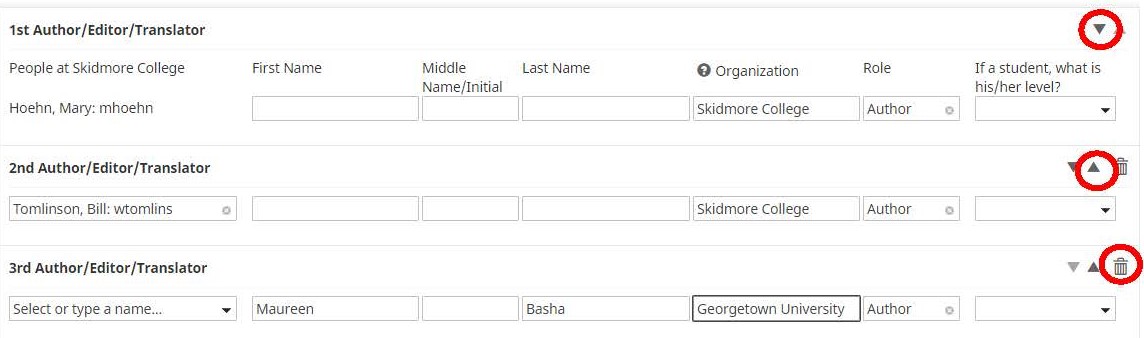
You can use the down-arrow icon to move a contributor down in the order, or the up-arrow icon to move a contributor up in the order.
If an arrow icon is grayed out as shown in the image above, the selected contributor cannot be moved up or down any further.
Similarly, additional contributors can always be deleted from records by clicking the delete icon at the far right of the row.
If you choose to delete a contributor, a pop-up window will appear to confirm your decision. Click the OK button to delete this author and return to the activity page.