Importing Publications
There are two ways for you to import your publications from other databases. From
Manage Activities, click on Publications under the Scholarship/Research category. From there, click on the Import button: 
You will then be given two different options for importing items: 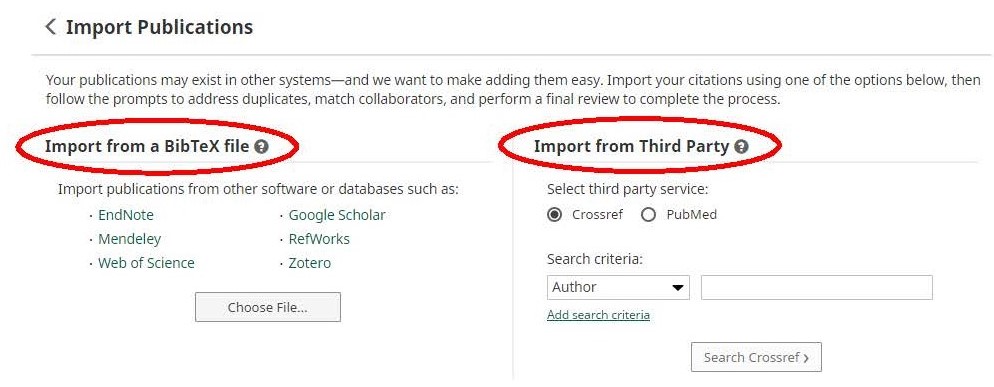
Option A: Import from a BibTeX file
Using the BibTeX Import feature within Digital Measures, you can import citations that are already stored in another software system such as a reference manager or database (e.g., EndNote, Google Scholar, Mendeley, RefWorks, Web of Science, and Zotero). Click here for a step-by-step guide: http://www.digitalmeasures.com/activity-insight/docs/bibtex.html
Option B: Import from Third Party
Using the Import from Third Party feature, you can pull your citations into Digital Measures directly from PubMed or Crossref without first saving them into a BibTeX file. Click one of the below links for a step-by-step guide:
PubMed: http://www.digitalmeasures.com/activity-insight/docs/pubmed.html
CrossRef: http://www.digitalmeasures.com/activity-insight/docs/crossref.html
Note: When importing from PubMed or Crossref, the automatic search may return items that are from similarly named researchers in addition to your own. To resolve this issue, make sure to click the checkboxes next to only the scholarly works that you have produced.