Writing on a Computer
Most classes post their course materials on TheSpring, Skidmore’s online course management system (CMS). Therefore, many of your professors will have you submit your written assignments directly to TheSpring. Other faculty may have you submit your papers to them via email or a separate course website. And still others will simply have you hand in a hard copy of your papers in class. Regardless of how you submit your papers, you will likely write your papers with a word processing program.
This section of The Skidmore Guide to Writing will address three important areas of information related to computers and writing: word processors available at Skidmore, backing up your work, and writing and Generative AI.
1. Word Processors at Skidmore
All of the standard word processing programs are regularly used and readily available to you at Skidmore: Microsoft Word, Apple Pages, and Google Docs. Your laptop or tablet may already have Word or Apple’s Pages. If not, Skidmore provides free access to Word as one of the apps on Microsoft 365, the web-based program you use to access your Skidmore (Outlook) email. Google Docs is another free word processing program you can use.
Whether exchanging papers for peer review or an appointment with a Writing Center tutor or submitting the final version of your paper to your professor, if you are using a web-based word processor, make sure that you correctly share the document with your intended recipient. In Word on Microsoft 365, click on the blue “Share” button at the top right hand of the screen.
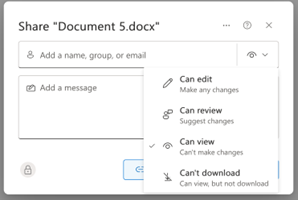 Enter the recipient’s email address and a message about the document you are sharing.
Most importantly, you must select the access you want the reader to have: edit (make
any changes), review (suggest changes), view (can’t make changes), can’t download
(can view, but not download). You can select the level of access from the eye icon
at the right end of the name slot. If you have already assigned an access level to
your recipients, you can also simply send them a link to your paper from the pull-down
Share menu.
Enter the recipient’s email address and a message about the document you are sharing.
Most importantly, you must select the access you want the reader to have: edit (make
any changes), review (suggest changes), view (can’t make changes), can’t download
(can view, but not download). You can select the level of access from the eye icon
at the right end of the name slot. If you have already assigned an access level to
your recipients, you can also simply send them a link to your paper from the pull-down
Share menu.
Sharing a paper from Google Docs is quite similar. First, from the Editing tab at the top right corner of the screen (the pencil icon), select the editing mode: editing, suggesting, or viewing. Then from the light blue Share button in the right-hand corner, enter the name or email of the persons you are sharing the paper with. Just like in Word on Microsoft 365, in Google Docs, after the recipient’s name, select their access: viewer, commenter, or editor. You can include a message to accompany the document, and then tap send.
If you are using a word processing program on your own computer, you can send your paper to others as an email attachment or by copy-and-pasting it into the body of your message.
2. Backing up your work
At the top of the monitor on my desktop office computer, I have a bright orange sticky note. On it, in all capital letters, in bold green ink is a single word followed by an exclamation point: SAVE! Nothing is more frustrating than losing a document because you forgot to save it regularly. But saving a document is not enough. Although the device you write on may be brand new and dependable, sometime over the next four years, it will fail you.

When you most need it--like at 11:50 PM when your paper is due at midnight—your laptop, tablet, or other seemingly reliable devise will CRASH. Maybe the battery has died. Maybe your roommate—or you—spilled coffee across the keyboard. It makes no difference. You have lost everything.
Unless.
Unless you also back up your work. If you are writing on a web-based word processor like Microsoft 365 or Google Docs, your work is automatically saved and backed up to the Cloud, so all you have to do is go to another computer, log in, and open the program. If you are using your own word processing program, you will want to make sure you back up your work regularly to a separate external hard drive, flash stick, or Cloud Storage, such as iCloud or Amazon Web Services (AWS). Skidmore provides free cloud storage to all students with Box (www.Skidmore.box.com) and OneDrive (from Microsoft 365). You can even sync your files from your laptop or tablet, so they are accessible from your cloud storage on Box or OneDrive.
You no longer have any excuses for lost work. Save and back up your work regularly. Like right now. It’s easier than blaming your dog for eating your homework!
3. Writing and Generative AI


We write to share information. But more than sharing factual information or objective
data, writing conveys our creative expression, our intellectual thoughts, and our
critical thinking. Our writing demonstrates how our minds interact with our subject
matter. When Skidmore professors assign papers, they are interested in learning
how you interact with the materials: what you have discovered from the research you
have done, what you have learned from synthesizing primary and secondary sources you
have read, how you have reasoned from the patterns in your data to draw conclusions.
At the center of the writing process and the resulting written product is you.
While professors value the clarity and readability of your writing, they are most
interested in your informed ideas. Understanding why you write is essential to understanding
the role generative AI may or should not play in your Skidmore education.
In its 2023 "Statement on Artificial Intelligence Writing Tools in Writing Across the Curriculum Settings," The Association for Writing Across the Curriculum captures the essential role writing plays in a college education:
[W]riting is a mode of learning. Students develop understanding and insights through the act of writing. Rather than writing simply being a matter of presenting existing information or furnishing products for the purpose of testing or grading, writing is a fundamental means to create deep learning and foster cognitive development. Learning to write within a field or major is also one of the most critical ways that emerging scholars and professionals become enculturated in a discourse community. (emphasis added)
Since the mid-1990s, computers have been the standard writing technology in college.
Today, we face a new challenge in with Generative AI. ChatGPT, Claude, and Co-pilot
have the potential to revolutionize how we write. We all know that a chatbot can
generate a college paper in less time than it takes to type the assignment into the
prompt window. If writing is “simply being a matter of presenting existing information,”
then some may argue that generative AI serves a purpose. But if writing “is a fundamental
means to create deep learning and foster cognitive development,” generative AI may
short circuit the learning process inherent in why we write. Whether you should
use Generative AI or how you can use it ethically are questions that colleges and
universities, faculty, and students are grappling with right now.
Skidmore does not have a single, college-wide policy on the use of AI. However, as a matter of academic ethics, our Academic Integrity Handbook classifies the use of AI chatbots as a potential act of plagiarism. The AIH defines plagiarism as “copying, paraphrasing, or imitating another person’s ideas, information, data, words, descriptions, choice of evidence, structure of argument, and so on.” Because of how Large Language Models (LLM) work, the AIH concludes, “Material gleaned from web sites or AI chatbots is no more your own than material printed in a book or journal,” so “Unacknowledged use of AI will be considered an act of plagiarism.”
While using an AI chatbot to generate all or part of an assignment violates Skidmore’s principles of academic integrity, there are ways that generative AI can assist in your writing process. Here are a few examples.
¤ Generative AI programs can be quite helpful in assisting you in brainstorming ideas that you can then develop through your own research to be the basis for a paper.
¤ Asking a chatbot to generate a list of potential topics or perspectives on a subject can be helping in your process of discovering a narrow focus for a paper.
¤ After having drafted your paper, asking a chatbot to proofread your paper so that it follows conventional grammar, punctuation, and spelling can help improve the readability of your prose.
But using generative AI as high-powered, energy-hungry spelling and grammar checker
seems like a waste of resources. However, a chatbot can also serve as a personal
tutor for you to improve your writing. If you ask the chatbot not only to correct
your paper but to provide you with a list of your errors, you can begin to learn from
your mistakes. If the “errors” do not make sense to you, you can ask the chatbot
to explain the principle to you and even give you other examples. Notice that you
are not asking the chatbot to change your ideas but rather to state them more clearly
and correctly. Before you use a generative AI program for any stage of your writing
process, it is best to clear this use with your professor and then to acknowledge
that use with a direct statement at the end of the paper.
Whether or how to use generative AI for your work is not as simple as mere acknowledgement.
Besides significant concerns about environmental impact and the potentially unauthorized
use of copywritten works, students must be aware that individual Skidmore faculty
set their own policies on the use of AI in their classes. These range from “not allowed”
to “encouraged.”
Let’s look at a few of the policies your faculty may follow.

Professor Ryan Overbey does not allow the use of AI tools in his classes. He writes:
‘Let’s call a spade a spade: once you see through the venture-capital fueled hype, you will understand that ChatGPT is not “artificial intelligence.” It’s a dumb plagiarism machine. Large language models (LLMs) were built by scraping publicly available texts on the Internet: Reddit posts, fanfiction archives, legal and illegal collections of scanned books and scholarly articles. They then blend these sources together into a tasteless slurry, regurgitating responses to your typed questions based on the mathematical probability that a given word is likely to come next in a phrase or sentence. . .. In terms of policy for this course: the writing assignments in this course exist to encourage you to work on your craft. Using a plagiarism machine to write for you is the opposite of working on your craft. Don’t do it. If I learn that you used ChatGPT or other LLMs for any written assignment in this course, the penalty will be an “F” grade for that assignment.”
 In contrast, Professor June Paul of the Social Work Department acknowledges that the
use of AI may be a valuable assistant to your work. Her policy explains, “This class
maintains a policy that you may use AI writing tools to assist you in the writing
process but that all artificially generated text needs to be explicitly labeled. In
handing in your assignment (reflection papers, oral presentation outlines, and any
other long-form assignments written at home), you agree to disclose the extent to
which you used ChatGPT and other AI writing tools in your assignment. All text written
by AI must be quoted with the source of the model in parentheses (ChatGPT), and you
may only use text written by AI for 2 sentences maximum per assignment.”
In contrast, Professor June Paul of the Social Work Department acknowledges that the
use of AI may be a valuable assistant to your work. Her policy explains, “This class
maintains a policy that you may use AI writing tools to assist you in the writing
process but that all artificially generated text needs to be explicitly labeled. In
handing in your assignment (reflection papers, oral presentation outlines, and any
other long-form assignments written at home), you agree to disclose the extent to
which you used ChatGPT and other AI writing tools in your assignment. All text written
by AI must be quoted with the source of the model in parentheses (ChatGPT), and you
may only use text written by AI for 2 sentences maximum per assignment.”
 Characterizing Generative AI as a tool rather than an assistant, Professor Erika Schielke
of the Biology Department cautions her students about their use of AI in her classes:
“AI tools, like ChatGPT, can be useful learning resources. However, they contain biases,
inaccuracies, and incomplete information. Using these tools requires interrogation
of the information and sources. It is your responsibility to ensure the accuracy of
any information you obtain from ChatGPT. You are expected to acknowledge any use of
ChatGPT – including the specific prompt(s) you entered. ChatGPT itself is not a source;
it is a tool used to compile information.”
Characterizing Generative AI as a tool rather than an assistant, Professor Erika Schielke
of the Biology Department cautions her students about their use of AI in her classes:
“AI tools, like ChatGPT, can be useful learning resources. However, they contain biases,
inaccuracies, and incomplete information. Using these tools requires interrogation
of the information and sources. It is your responsibility to ensure the accuracy of
any information you obtain from ChatGPT. You are expected to acknowledge any use of
ChatGPT – including the specific prompt(s) you entered. ChatGPT itself is not a source;
it is a tool used to compile information.”
 Professor Matt Lucas of the Management and Business Department recognizes AI as an
emerging technology that graduates will be expected to know how to use properly.
His policy states that it is “an expectation that you use AI (e.g., ChatGPT and image
generation tools) in this class. In fact, some assignments will require it. Learning
to use AI is an emerging skill and I provide tutorials on how to use them. I am happy
to meet and help you with these tools during office hours or after class.” Even with
his enthusiasm for AI, Professor Lucas cautions his students to “be aware of the limits
of ChatGPT” and to “be thoughtful about when this tool is useful. Don’t use it if
it isn’t appropriate for the case or circumstance.”
Professor Matt Lucas of the Management and Business Department recognizes AI as an
emerging technology that graduates will be expected to know how to use properly.
His policy states that it is “an expectation that you use AI (e.g., ChatGPT and image
generation tools) in this class. In fact, some assignments will require it. Learning
to use AI is an emerging skill and I provide tutorials on how to use them. I am happy
to meet and help you with these tools during office hours or after class.” Even with
his enthusiasm for AI, Professor Lucas cautions his students to “be aware of the limits
of ChatGPT” and to “be thoughtful about when this tool is useful. Don’t use it if
it isn’t appropriate for the case or circumstance.”
Your Responsibility:
The Skidmore Honor Code expects you to be ethical and exercise academic integrity
in all the work you do at Skidmore. The use of AI is no exception. Always be sure
to consult your professor about their policies regulating the use of AI in their classes.
As Professor Schielke notes in her policy, this, too, “is your responsibility” as
a writer at Skidmore.